Dev Guides
Integrations

The integration system is built on the idea that there are certain services that my FabLMS application will need to use that are either too hard to build by myself, or need too many resources that are not available to a user running my application, or to provide options other than the ones that I can provide. What it means in code is that when I have an option that could or must be handled by an external service, I will make a call to this Integration System that will provide me a way to do what I want to do through a previously-registered service.
A great example is authentication; I have an internal authentication system that can handle user authentication via an internal database and hashed passwords. It has ways to reset passwords and ties with my Login Livewire Component. However, you might need a more robust authentication method, or perhaps a way to authenticate via an existing server that is separate than this one, such as an OpenLDAP or Active Directory server. In fact, there are many, many types and services that are much better than my authentication method that I might want to use with my existing Login Component. So, when it comes time to actually authenticate a user, I will instead call my Integration System and ask for the Authentication Service and let it handle it.
Nomenclature
Service: A service is a way to provide the FabLMS application a method of doing something that it may not be able to do locally, or at all.
Service Connection: A connection to a service that can be used to access the service's methods and capabilities. There are two types: system and user connections.
System Connection: A connection to a service that is used system wide. It does not need any user to provide authentication or connect directly, just the administrator connecting the whole system to it.
User Connection: A connection to a service that can only be used by a user with the correct permissions. These permissions might be access permissions, or actually require the user to authenticate or connect somehow.
Integrator: A top level model that contains a list of services that a single company or entity provides. This is the top-level way to logically group services. It is also an entry in the integrators table and defined as a App\Models\Integrations\Integrator Model.
Integration Service: A service that an integration provides. Integrators may provide as many or as few (but at least one) services as it can. An entry in the integration_services table and defined as an App\Models\Integrations\IntegrationService Model.
Integration Connection: A service connection that is provided by an Integrator for an Integration Service. An entry in the integration_connections table and defined as an App\Models\Integrations\IntegrationConnection Model.
Available Services
This section describe all the available services starting in Iteration2 or later. Any services added after Iteration2 will be labeled with the iteration or tag or version that it was released in. All services have an entry in the App\Traits\IntegratorServiceTypes Enum.
| Service Name | Service Description | System | User | Release |
|---|---|---|---|---|
| Authentication | This is the most basic service for an integrators, allowing users to authenticate against their database. The Authentication service is responsible for authenticating a Person model (which represents a user) against a password database. In case of the Local Integrators, it auths against a local hashed-passwords database. In the case of Google it does an oAuth 2.0 against the Google Suite. | There is no system connection to Authentic | The user can authenticate to the service to get access to the FabLMS system, or to get access to other services by the integrator. For example, the Google auth system can be set to authenticate the user to be allowed into FabLMS, or to authenticate to use Google Docs. | Iteration2 |
| User Documents | This service allows users to use an external document repository, such as Google Docs. The service offers a way to link these documents and use them to submit Learning Demonstrations, or attach to emails, etc. The Local Service has local storage in the server. | There is no system connection to User Documents. | The user can interact with their document repository using the system's Documents Browser, that will allow anything from document management, to file selection and submission. | Iteration2 |
| System Storage | This service lets the system access storage in order to persist files that need to be kept for historical purposes. In a lot of cases, files submitted by people need to be stored in a place that they cannot be modified. For example, when a student submits a file for assessing, we do not want to the user to continue changing the file after submission. Instead, the system will save that submission to System Storage to enforce file integrity. | The system connects to a System Storage Service and this storage can be assigned to Storage locations through the Storage Settings. Each Storage location stores a specific kind of files, so the Learning Demonstration Storage will store all files related to Learning Demonstrations in that storage. | There are no user connections to System Storage. | Iteration2 |
| AI | This service lets the system and the users access an AI LLM in order to run prompts. All prompts are defined in the system and need to be executed by the users. | The system connects to the AI service to be able to provide users with a “Global” AI connection. Any users with the correct permissions can access the system's AI and use it to run queries. | Users can also connect to their own AI LLM and execute the queries that way. This has the advantage the the LLM used can be tailored to the user, or be more powerful than what the system offers. | Iteration2 |
| Texting | This service allows the system to text people. It requires permission by the person being texted to agree to be texted. This is a federal issue and administrators must make sure to follow all regulations to get an account. Once this account is set up, however, the system can use this service to send text and notifications about things. | The system connects to this service in order to send text as notifications to the people who have signed up for these notifications. | There is no user connection to texting. | Iteration2 |
| This service allows the system to email people or groups. This is anything from password resets to school notices or mailing lists. The local system will use the Local Email Transport, which could be set up as anything. Alternatively, you can set up another email service and handle it directly. | The system can only connect to a single email service. It will use this connection to send all email. | There is no user connection to emailing. | Iteration2 | |
| Class Management | This service gives the system and teachers a way to choose how to manage their classes. Class management is different from the rest of the rest of the system in the sense that it only really cares about how to present class material to students. Creating the Learning demonstrations, assigning rubrics, and assessing will still be done by the system. The integration will also be in charge of synching anything between FabLMS and its own class presentation. | The system is able to connect to a multiple class management systems and make choice whether all teachers must use the selected system class management, or whether to allow users to select their own class management system but set a fallback system. | The only users able to use this system are teachers, and they're allowed to set the management system on a per-class level. The will have the options to set their classes to use one of the connected class management methods and assign all or individual classes to this management system. | Iteration2 |
Database Structure
The Integration System uses three database tables to keep all the information:
- integrators - This table has an entry for every available Integrator in the system
- integration_services - This table has an entry for every service available in the system.
- integration_connections - This table has an entry for every connection that either a user or the system has to a service.
This is the database diagram:
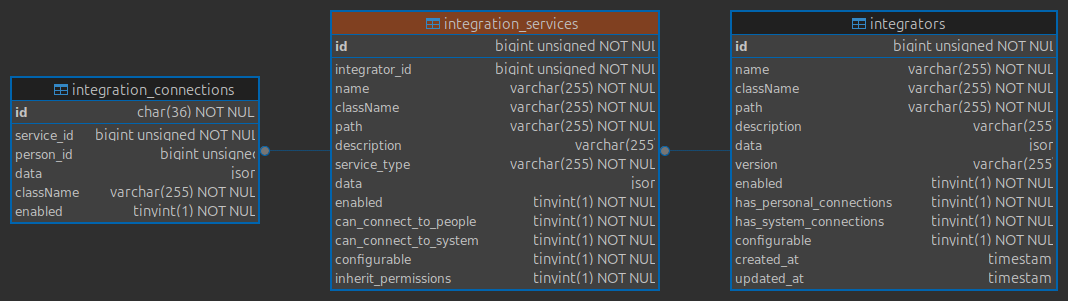
Now, lets describe each of the fields:
| integrators | |
|---|---|
| Field Name | Description |
| id | Primary id key of the model |
| name | The name of the integrator. Mainly used to show information about this integrator. |
| className | The actual class name (with namespace) of the class that this Integrator Model represents. This class will be instantiated and given the Integrator's model information. This class is written by the 3rd party developing the integrator and is considered “custom code". |
| path | The path designated to this integrator so all the routes can be accessed. All routes and paths will be prefixed by this value. |
| description | The description of this integrator. Mainly used to show information about the Integrator. |
| data | This is a JSON field that can be used to persist data to the database. How it is used (or whether it is used) is up to the integrator to define. |
| version | The version number of this integrator. Used in the update functionality. |
| enabled | Whether this integrator is enabled and can be used. |
| has_personal_connections | Whether this integrator has services that Users can connect to. |
| has_system_connections | Whether this integrator has services that the System can connect to. |
| configurable | Whether this integrator can be configured. |
| integrations_services | |
|---|---|
| Field Name | Description |
| id | Primary key of the model |
| integrator_id | ID of the integrator that this service belongs to. |
| name | The name of this service, used to show information about this service. |
| className | The actual class name (with namespace) of the class that this Integration Service Model represents. This class will be instantiated and given the integration service's model information. This class is written by the 3rd party developing the service and is considered “custom code". |
| path | The path designated to this service so all the routes can be accessed for this service. All routes and paths will be prefixed by this value. |
| description | The description of this integration service. Mainly used to show information about the service. |
| service_type | The type of service for this entry. Must be of type App\Traits\IntegratorServiceTypes |
| data | This is a JSON field that can be used to persist data to the database. How it is used (or whether it is used) is up to the service to define. |
| enabled | Whether this service is enabled an can be used. |
| can_connect_to_people | Whether users in the system can connect to this service. |
| can_connect_to_system | Whether the system can connect to this service. |
| configurable | Whether this service can be configured by an admin. |
| inherit_permissions | All services have permissions about who are able to use them. All permissions can be set at the integrator level and are inherited by the services if this field is set to true. If it is set to false, then permissions can be assigned directly to this service. |
| integration_connection | |
|---|---|
| Field Name | Description |
| id | Primary key of the model. This key is a uuid. |
| service_id | The id of the service that this connection is for. |
| person_id | The id of the person that this connection belongs to. If this is null, then it is considered a system connection |
| data | This is a JSON field that can be used to persist data to the database. How it is used (or whether it is used) is up to the connection to define. |
| className | The actual class name (with namespace) of the class that this Integration Connection Model represents. This class will be instantiated and given the integration connection's model information. This class is written by the 3rd party developing the service and is considered “custom code". |
| enabled | Whether this connection is enabled or not. |
Models
There are three base models that are defined in the system that correspond to the database models: App\Models\Integrations\Integrator, App\Models\Integrations\IntegrationService and App\Models\Integrations\IntegrationConnection. These models will never be instantiated. Even if you call Integrator::find($id), you will not get back an instance of the Integration class. Instead, you will always get back an instance of the Integrators' className class, which is a class that is a grandchild of the model class. This is done through a special Model method, newFromBuilder, which is called whenever the model class is instantiated and it makes sure it returns an instance of the class stored in the className database field.
public function newFromBuilder($attributes = [], $connection = null)
{
	if($attributes instanceof \stdClass)
		$attributes = json_decode(json_encode($attributes), true);
	if($attributes['className'] == static::class)
		return parent::newFromBuilder($attributes, $connection);
	return (new $attributes['className'])->newFromBuilder($attributes, $connection);
}
The className class defined in the model's code always refer to the custom code that is provided by the integrator. Each of the custom classes will inherit a middle, abstract class that defines the interface that your integrator classes must define. This is what makes the integration possible, with integration code written to access the integration's services through the given interfaces that FabLMS can then use as “hook points". In this section, I will go in-depth of how each model and abstract class behaves for all three models.
Integrator
This is the top level model App\Models\Integrations\Integrator which is stored in the integrators table. This model has the most basic functionality, such as getting al the services and some of the internal database fields. It also defines data as a array that will be persisted as JSON data, which allows the Integrator to store and persist data to the database. This model class is extended by the abstract class LmsIntegrator which defines all the functions that the custom integration must implement. Here is the implementation of the abstract class.
abstract class LmsIntegrator extends Integrator
{
	public static function autoload(): static
	{
		return static::where('path', static::getPath())
		             ->first();
	}

	/**
	 * @return string THis will return the path name that it will prepend anytime a route needs to access this integrator.
	 */
	abstract public static function getPath(): string;

	/*****************************************
	 * INSTANCED ABSTRACT FUNCTIONS
	 */

	/**
	 * @return string The name of this integrator
	 */
	abstract public static function integratorName(): string;

	/**
	 * @return string The description of this integrator
	 */
	abstract public static function integratorDescription(): string;

	/**
	 * @return array The default data to save when this integrator is instatiated for the first time.
	 */
	abstract public static function defaultData(): array;

	/**
	 * @return string Rreturns the current version of this integrator.
	 */
	abstract public static function getVersion(): string;

	/**
	 * @return bool Whether this integrator can connect to people.
	 */
	abstract public static function canConnectToPeople(): bool;

	/**
	 * @return bool Whether this integrator can connect to the system.
	 */
	abstract public static function canConnectToSystem(): bool;

	/**
	 * @return bool Whether this integrator can be configured.
	 */
	abstract public static function canBeConfigured(): bool;

	public function ableToIntegrate(Person $person): bool
	{
		return ($this->enabled && $this->hasAnyRole($person->schoolRoles) && $this->canIntegrate($person));
	}

	/**
	 * This function will check if this integrator can integrate with the person (NOT authenticate))
	 * @param Person $person THe person to check
	 * @return bool Whether this integrator can integrate with the person.
	 */
	abstract protected function canIntegrate(Person $person): bool;

	/*****************************************
	 * STATIC FUNCTIONS
	 */

	/**
	 * This function rgisters all the service this integrator has.
	 * @param IntegrationsManager $manager The manager to register services with
	 * @param bool $overwrite Whther to overwrite the existing settings.
	 * @return void
	 */
	abstract public function registerServices(IntegrationsManager $manager, bool $overwrite = false): void;

	/**
	 * @return bool Whether the integrator is outdated and should be updated.
	 */
	abstract public function isOutdated(): bool;

	/**
	 * @param IntegratorServiceTypes $type The type of service to check for
	 * @return bool Whether this integrator has this service.
	 */
	abstract public function hasService(IntegratorServiceTypes $type): bool;

	/**
	 * @return string The url to the entry point of the configuration page for this integrator.
	 */
	abstract public function configurationUrl(): string;

	/**
	 * @return string The url for the image icon for this integrator.
	 */
	abstract public function getImageUrl(): string;

	/**
	 * @param Person $person The person to check the integration status for
	 * @return bool Whether the person is integrated with this integrator.
	 */
	abstract public function isIntegrated(Person $person): bool;

	/**
	 * This function will return a URL that will be able to integrate the person with this integrator. The
	 * URL can be a redirect URL, or a URL to a third-party website, or even a URL to an integrator-defined
	 * route.
	 * @param Person $person The person to integrate
	 * @return string The URL that will integrate the person with this integrator.
	 */
	abstract public function integrationUrl(Person $person): string;

	/**
	 * This function will remove the integration for the person.
	 * @param Person $person The person to remove the integration for
	 * @return void
	 */
	abstract public function removeIntegration(Person $person): void;

	/**
	 * This function will get called in the web routes which will publish all the routes for this integrator.
	 * ALL the routes here will be prefixed by a /integrations/ then integrator's getPath() (@return void
	 * @see LmsIntegrator::getPath())
	 * so if your integrator returns a path of 'local', then the routes will be published as /integrations/local/*
	 */
	abstract public function publishRoutes(): void;
}
Lets go over the methods that need to be defined.
abstract public static function getPath(): string;
abstract public static function integratorName(): string;
abstract public static function integratorDescription(): string;
abstract public static function defaultData(): array;
abstract public static function getVersion(): string;
abstract public static function canConnectToPeople(): bool;
abstract public static function canConnectToSystem(): bool;
abstract public static function canBeConfigured(): bool;
abstract public function getImageUrl(): string;
The first few are actually descriptors, meaning functions that the system will use to display information about this integrator. A lot of this data will simply be persisted to the database and only updated when the integrator gets re-registered or updated.
abstract protected function canIntegrate(Person $person): bool;
abstract public function isIntegrated(Person $person): bool;
abstract public function integrationUrl(Person $person): string;
abstract public function removeIntegration(Person $person): void;
The next four functions deal with user integration, which is different than connecting or using services. Certain integrators offer certain services automatically when a user authenticates and gives the correct permissions, without the need for a user to connect to each service individually. For example, Google can offer authentication, user documents and class management without having to do different authentications. Instead of having to authenticate to each service individually, these functions allow a user to directly integrate with an integrator and, in turn, get connected to all the available services at once. These four functions check if people can integrate, if they are already integrated, a way to insatiate the integration and a way to remove the integration.
abstract public function isOutdated(): bool;
This function is not yet integrated into the system. It is essentially a way for the system to know if you need to update this Integrator. It will tie into the system that will allow publishers to update the integrators and release new versions, and for admins to be able to update them easily.
abstract public function hasService(IntegratorServiceTypes $type): bool;
This function checks if the integrator offers the passed service.
abstract public function registerServices(IntegrationsManager $manager, bool $overwrite = false): void;
This is the main function that will register all the services that this Integrator offers. The function will pass the IntegrationManager object, which is able to register any services. This manager will be used to retrieve and register all Integration Connections.
abstract public function publishRoutes(): void;
This function is responsible for publishing all the routes that this integrator will need. All the routes with be prefixed with the path /integrators/ and the integrator path prefix, same as the name, which will be prefixed by the same.
abstract public function configurationUrl(): string;
This last function is the relative URL path to the main configuration of the integrator. This is the entry point to the actual config page to this Integrator.
IntegrationService
This uses the base model App\Models\Integrations\IntegrationService and the database table integration_services. It contains the basic functions needed to access other models through the database. It is also descended by the abstract class LmsIntegrationService, which has all the functions that your Integration Service must define. Each service provided by the Integrator must have its own class defining these functions. The structure of the abstract class is as follows:
<?php

namespace App\Models\Integrations;

use App\Enums\IntegratorServiceTypes;
use App\Models\People\Person;

abstract class LmsIntegrationService extends IntegrationService
{
	/*****************************************
	 * CONNECTIONS TO USERS
	 */

	/**
	 * @return IntegratorServiceTypes The type of service this is.
	 */
	abstract public static function getServiceType(): IntegratorServiceTypes;

	/**
	 * @return string The name of this service.
	 */
	abstract public static function getServiceName(): string;

	/**
	 * @return string The description of this service.
	 */
	abstract public static function getServiceDescription(): string;

	/**
	 * @return array The default data to save for this service.
	 */
	abstract public static function getDefaultData(): array;

	/**
	 * @return bool Whether this service can connect to a user in the systsem
	 */
	abstract public static function canConnectToPeople(): bool;

	/**
	 * @return bool Whether this service can connect to the system
	 */
	abstract public static function canConnectToSystem(): bool;

	/**
	 * @return string THis will return the path name that it will prepend anytime a route needs to access this service
	 */
	abstract public static function getPath(): string;

	/**
	 * @return bool Whether this integration service can be configured.
	 */
	abstract public static function canBeConfigured(): bool;

	/**
	 * Attempts to connect this service to the person.
	 * @param Person $person The person to connect to
	 * @return IntegrationConnection|null Returns the connection if it was successfully connected, else null.
	 */
	final public function connect(Person $person): ?IntegrationConnection
	{
		//check if we can connect to this person
		if(!$this->ableToConnect($person)) return null;
		//check if the connection already exists
		if($this->isConnectedTo($person)) return $this->activeConnection;
		//if we're connected to someone else, close the connection
		if($this->isConnected()) $this->closeConnection();
		//since we can connect, check if the connection is already established, else establish it.
		if(!$this->hasServiceConnection($person))
		{
			$data =
				[
					'data' => ($this->getConnectionClass())::getInstanceDefault(),
					'className' => $this->getConnectionClass(),
					'enabled' => true,
				];
			$this->registerServiceConnection($person, $data);
		}
		//attempt to get the connection
		$connection = $this->getServiceConnection($person);
		//but is it enabled?
		if($connection->enabled)
			$this->activeConnection = $connection;
		return $this->activeConnection;
	}

	final public function ableToConnect(Person $person)
	{

		return $this->enabled && $this->integrator->enabled && $person->hasAnyRole($this->schoolRoles) && $this->canConnect($person);
	}

	/**
	 * @param Person $person The person to establish the connection with
	 * @return bool Whether a connection between this service and the person can be established. If false, it means
	 * The user must attempt to register the connection first, thus establishing the connection.
	 */
	abstract public function canConnect(Person $person): bool;

	/**
	 * @param Person $person The person to check if we're connected to.
	 * @return bool Whether we're connected to the person.
	 */
	final public function isConnectedTo(Person $person): bool
	{
		return ($this->isConnected() && $this->activeConnection->person_id == $person->id);
	}

	/**
	 * @return bool Whether there is a connection already established.
	 */
	final public function isConnected(): bool
	{
		return ($this->activeConnection !== null);
	}

	/**
	 * This function closes the existing connection
	 * @return void
	 */
	final public function closeConnection(): void
	{
		$this->activeConnection = null;
	}

	/**
	 * @param Person $person The person to check if we have a connection to.
	 * @return bool Whether the person has a connection to this service.
	 */
	public function hasServiceConnection(Person $person): bool
	{
		return $this->personalConnections()
		            ->where('person_id', $person->id)
		            ->exists();
	}

	/**
	 * @return string The class name to use for the connection.
	 */
	abstract public function getConnectionClass(): string;

	public function registerServiceConnection(Person $person, $data = null): void
	{
		$this->personalConnections()
		     ->attach($person->id, $data);
	}

	/*****************************************
	 * INSTANCED ABSTRACT FUNCTIONS
	 */

	public function getServiceConnection(Person $person, ?array $registerData = null): ?IntegrationConnection
	{
		if(is_array($registerData) && !$this->hasServiceConnection($person))
			$this->registerServiceConnection($person, $registerData);
		return IntegrationConnection::where('service_id', $this->id)
		                            ->where('person_id', $person->id)
		                            ->first();
	}

	/**
	 * This function erasaes the connection between this service and the person.  It also erases saved settings.
	 * @param Person|null $person The person to disconnect from. If null, we're disconnecting from the person we're currently connected to
	 * @return void
	 */
	public function forgetConnection(): void
	{
		if($this->activeConnection)
			$this->forgetServiceConnection($this->activeConnection->person);
	}

	public function forgetServiceConnection(Person $person): void
	{
		$this->personalConnections()
		     ->detach($person->id);
	}

	public function forgetSystemServiceConnection(): void
	{
		IntegrationConnection::where('service_id', $this->id)
		                     ->where('person_id', null)
		                     ->delete();
	}

	/**
	 * This function attempts to connect this service to the FABLMS system.
	 * @return LmsIntegrationConnection|null Returns the established connection, null otherwise.
	 */
	public function connectToSystem(): ?IntegrationConnection
	{
		//check if we can connect to system.
		if(!$this->canSystemConnect()) return null;
		//check if the connection already exists
		if($this->isConnectedToSystem()) return $this->activeConnection;
		//if we're connected to someone else, close the connection
		if($this->isConnected()) $this->closeConnection();
		//since we can connect, check if the connection is already established.
		if(!$this->hasSystemConnection())
		{
			$data =
				[
					'data' => ($this->getSystemConnectionClass())::getSystemInstanceDefault(),
					'className' => $this->getSystemConnectionClass(),
					'enabled' => true,
				];
			$this->registerSystemServiceConnection($data);
		}
		//if we're connected to the system, save the connection and return true.
		$this->activeConnection = $this->getSystemServiceConnection();
		return $this->activeConnection;
	}

	/**
	 * Similar to the above function, but for the system connection
	 * @return bool Whether a connection between this service and the system can be established.
	 */
	abstract public function canSystemConnect(): bool;

	/**
	 * @return bool Whether we're connected to the FABLMS system.
	 */
	public function isConnectedToSystem(): bool
	{
		return ($this->isConnected() && $this->activeConnection->person_id == null);
	}

	/*****************************************
	 * CONNECTIONS TO SYSTEM
	 */

	public function hasSystemConnection(): bool
	{
		return IntegrationConnection::where('service_id', $this->id)
		                            ->where('person_id', null)
		                            ->exists();
	}

	/*****************************************
	 * STATIC ABSTRACT FUNCTIONS
	 */

	/**
	 * @return string The class name to use for the connection to the system
	 */
	abstract public function getSystemConnectionClass(): string;

	public function registerSystemServiceConnection($data = null): void
	{
		$data['person_id'] = null;
		$data['service_id'] = $this->id;
		IntegrationConnection::create($data);
	}

	public function getSystemServiceConnection(): ?IntegrationConnection
	{
		return IntegrationConnection::where('service_id', $this->id)
		                            ->where('person_id', null)
		                            ->first();
	}

	public function forgetSystemConnection(): void
	{
		if(!$this->isConnectedToSystem()) return;
		$this->activeConnection->delete();
	}

	/**
	 * This function is slightly different from the connection functions. In some cases, people might be able
	 * to connect to a service, but not until they enter some data, such as a key or an authentication code.
	 * In those cases, while it is might not be possible to connect, it might be possible to register to this
	 * service in order to be able to connect. This function will return true if users (not the system, as that is
	 * handled through the autoconnect function) can register to this service.
	 * @return bool Whether users may register to the connection.
	 */
	abstract public function canRegister(): bool;

	/**
	 * If users ARE going to be able to register to this service, this function will return the route with a form
	 * that will allow them to register them for the service and connect them.
	 * @return string The route to the registration page.
	 */
	abstract public function registrationUrl(): string;

	/**
	 * @return bool Whether this service should be autoconnected to the system on registration
	 */
	abstract public function systemAutoconnect(): bool;

	/**
	 * @return string The url to the entry point of the configuration page for this integration service.
	 */
	abstract public function configurationUrl(): string;
}
Let's go over the methods that we need to define.
abstract public static function getServiceType(): IntegratorServiceTypes;
abstract public static function getServiceName(): string;
abstract public static function getServiceDescription(): string;
abstract public static function getDefaultData(): array;
abstract public static function canConnectToPeople(): bool;
abstract public static function canConnectToSystem(): bool;
abstract public static function getPath(): string;
abstract public static function canBeConfigured(): bool;
Just like the LmsIntegrator class, the first functions are used to fill out the information on the database and to provide information for the system to display about this service, such as the name, description, etc.
abstract public function canConnect(Person $person): bool;
abstract public function canSystemConnect(): bool;
The two functions need to be implemented to make sure that either the system or the user can connect. This might be dependent on other factors. For example, in order to connect to the Google User Documents services, the user needs to be registered by the Integrator. This is the function that will be called prev iously to attempting to connect to a service.
abstract public function getConnectionClass(): string;
abstract public function getSystemConnectionClass(): string;
These functions return the class that is used as a connection for either the system or a person. This class will be stored in the integration_connections table and will be instatiated whenever the connection is called.
abstract public function canRegister(): bool;
abstract public function registrationUrl(): string;
These function are used in the case where a user cannot connect to a service until they are registered with it. For example, if we only offer Google Documents as an integration for Google, access is not given until the user authenticates to Google. So the user may register for the service which will allow the user to connect to it. The registration itself happens through the registration URL.
abstract public function systemAutoconnect(): bool;
This function determines whether the system should auto connect to this service when registering, instead of having it registered through a user.
abstract public function configurationUrl(): string;
This function returns the URL path to the configuration route of this service.
IntegrationConnection
The base class for these classes is the App\Models\Integrations\IntegrationConnection model, which refers to entries in the integration_connections table. The main difference in this class and the other two is that there isn't a single descendant for other classes to extend. Rather, the system defines multiple Connection classes that your system must extend in order for the system to use that service. Each connection class that you extend will have their own set of functions that you must implement. Each class has different functions that are specific to the service it provides. I will not be going over each class, as the number of connection classes will increase the more integration options I add. At this point the following connection classes are defined:
- AiConnection - Connection to AI for the user.
- AiSystemConnection - Connection to AI for the system.
- AuthConnection - Connection for authenticating both users and system.
- ClassesConnection - Connection for managing classes.
- DocumentFilesConnection - Connection for using files by user.
- EmailConnection - Connection for sending emails.
- SmsConnection - Connection for sending texts.
- WorkFileConnection - Connection for the system to store files.
Registering Services
Once the Integrator and its Services are built, they have to be registered in the system. At the moment this is done through the artisan command php artisan fablms:register-integrator <Integrator Class>. Currently at this point in writing, this is the only way to register an Integrator. Eventually this should be done in the system via a package-like interface where Integrators can be browsed, installed and upgraded from a remote location.
What does registering a service mean? Well, the first thing that happens is that an entry in the integrators table is generated using the static methods in the Integrator class. The Integrator class is also saved to the className field in the database. Once the database row is persisted, the model is re-loaded, which will return an instance of the Integrator class with all the data persisted to the database. This will give us access to instantiated methods, including the registerServices method which is called next.
In this method, your code is supposed to use the IntegrationManager instance passed to it to call the method registerService for every service that this Integrator has to offer. This function requires the original integrator instance passed to the method, the class name of the service you would like to register and whether the data should be overwritten. If this is your first time registering the Integrator all the data will be persisted from the defaults.
For every service that you register, two things will happen. The first is that an entry in the integration_services will be created using the static functions form your class. The second thing is that if the flag to auto connect is set, and the system can auto connect to the service, a connection will be established. Every service is enabled by default.
Connecting to a Service
We've been talking about connecting to a service, either by the system or a user, but what does it actually mean to connect to a service? Mainly it means that there is an entry in the integration_connections table that links a user (or the system in the case of null entries for people) to a service with a Connection Class. The only way establish a connection is for a person (or system) is for the service code to allow the connection (via internal logic) which then leads to an entry entered into the table. The table is populated with the service that it is connected to, the person (or system), the className to instantiate the connection and the data array used to hold any settings needed for the connection.
As long as there is an entry in the integration_connections table, the connection is assumed to be established and enabled. If such a state were to change, it is up to your code to terminate the connection by deleting the entry on the table. Once the entry is there, it can be retrieved and the functions in the class may be accessed to facilitate the integration. The integration happens by the system calling the functions in the Connection Class.
Registering to a Service
Connecting to a service is rather automatic. A connection is attempted to a service and it either fails (because of the canConnect function call) or it succeeds and it connects. There is, however, no way to require a previous action or authentication before the connection. In some cases, however, we need to have some sort of user action in order to be able to connect. For example, if the system is setup to work with Google and all users login through Google, they will have access to their documents. The connection will happen automatically, because they're already signed in through Google. If they wanted to also connect to Microsoft there needs to be a way that they can authenticate to Microsoft so that they can get access to their services.
This is done through Registration. Registration checks to see if a user can connect to a service after some sort of authentication. For Microsoft, for example, it would require an oAuth login to access the services. For this case, a service or Integrator can provide a registration URL to use as a way to authenticate to a service. Once the user goes through the authentication, a connection is then established with the correct tokens to access the services. Once the registration and connection is complete, the user is allowed to use the integration.
Configuring a Service
In a lot of cases, services and integrators might need some configuration options. It might be an AI key for the AI connection, or an identity file for a service account, or maybe just some data that it might need to make the connection. There needs to be a way to add this information through the web interface, as I would like the least amount of configuration to happen in the config files in the server. To this end, the integrators themselves are allowed to publish their own routes in order to be able to offer configuration pages for their services.
There are two configuration options for services and Integrators. The first one is handled by the system, which is the permissions system. Every integrator can be assigned permissions for people who can use it. Similarly, all services are tied to permission roles as well, but they have the option to inherit the permissions from the Integrator itself. Permissions determine who can use the service or the integrator. The permissions for both the Integrator and its services are handled by the system.
The second configuration option is written entirely by the integrator. It is not required for the integrator or service to have any configuration, it is completely optional. The way that the config looks is also completely up to the integrator. However, if the integrator so chooses, it may extend the layouts.integrations layout like so:
@extends('layouts.integrations', ['breadcrumb' => $breadcrumb, 'selectedService' => $service])

@section('integrator-content')
...config code goes here...
@endsection
You should pass the breadcrumb to make it look the same as the other pages, and you can pass either the $selectedService or $selectedIntegrator variable to highlight what is active. This will frame your config code in a display-friendly user UI that “fits” with the rest of the system. This is not a requirement, as you can make the config page look in any way you wish, but the option is there. How you handle the configuration is up to you as well. You can make it into a Livewire component, or a regular GET/POST/PATCH/PUT HTML form. You can add the methods to your own controller and publish the routes in the integrator's publishRoutes function.
Calling a Service
Once the integrator and the services has been constructed and registered, how are they actually called from the code? Well, it completely depends on whether the code is using a system connection or a personal connection. We will talk about both.
System Calls
All calls made by the system must be setup ahead of time. There is no way for the system to make a choice in which service it should use. The choice must be made by an administrator with the correct privileges. All these choices are set up in the School Settings system, which offers all the overall school settings. So, most system calls will be made from a SystemSetting model.
A perfect example of this is the System Storage. The system creates certain categories of system storage (all defined ahead of time). Every model that requires system storage (extend Fileable) needs to return the key of which storage to use. The administrator, when setting up the school, selects which service is used for each system storage category. The may keep the same one, or mix and math. This ties a system storage category to an integration connection which is used to store the documents. Whenever a document needs to be stored in the system storage, a call is made to the StorageSettings model, which will return the connection needed to store the files, a descendant of the WorkFilesConnection abstract class that implements methods such as persistFile, deleteFile, or download.
User Calls
Users are auto-connected to services at login. If they need to reconnect to a new service, they must log off and back on. If they register a service, then the connection should happen during that registration. Once that connection is established, it can be accessed again through the IntegrationsManager::personalConnections() function. Whenever there's a need (or an option) for a service, you can use this function to get all available connections for that service to the user. The connection can then be utilized through the appropriate connection API.